Over time, your hard disk gets cluttered up with unnecessary files, which then take up disk space. Removing these files should be part of your regular computer maintenance. The process is simple and is the same for WinXP and Vista.
- Click the START button
- Open MY COMPUTER
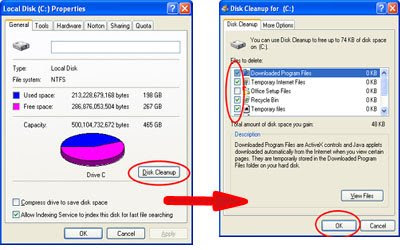
- RIGHT Click on the Local Disk"C" drive and select PROPERTIES (a new window comes up)
- Click the DISK CLEANUP button.
- If asked if you want to remove the files for all users or just your own, click the option to remove all files.
After clicking the DISK CLEANUP button, the computer will search for files that can be cleaned up (this process takes a couple of minutes). When the computer is done searching, a window will pop up that shows you which files can be safely removed.
Place a
check mark next to the files you wish to remove. For the most part, you want to make sure the following boxes are checked:
- Temporary Internet Files
- Recycle Bin
- Temporary Files
- Web/Client Publisher Files
I tend to leave the SETUP files unchecked to minimize
uninstallation problems down the road. And although I like to remove downloaded programs, others don't. So this is a personal preference. But make sure the items above are checked at least.
When all the boxes are checked, click the
OK button to remove the files.
I recommend running Disk Cleanup at least quarterly. It's also a good idea to run it before you
Defrag your hard drive so that process is more efficient.


