Just about everything you can do with a mouse can be done with a keyboard shortcut. Although most people don't care to learn the shortcuts, they can be handy in various instances (for example, when the mouse fails). Some keyboard shortcuts are also time savers.
Many of us use "Cntrl + C" and "Cntrl + V" to copy and paste, respectively. These are two shortcuts which are not only time savers, but also tend to work in those instances where "Copy/Paste" are not available on a right click of the mouse.
Most software applications also have keyboard shortcuts. For example, if you're typing away in Microsoft Word and want to save your document, you can hit "Cntrl + S" on the keyboard. This same keyboard shortcut works in most other software applications too.
When you're working in software, you can usually figure out the keyboard shortcut by looking at the menu. Commands (like Save, Exit, etc.) will usually have the keyboard shortcut next to it ... they'll have a letter underlined. When you see a letter underlined in the menu, it typically means that hitting "Cntrl" plus that letter on the keyboard is the shortcut.
Here's handy link with some keyboard shortcut cheat sheets you can download. Notice that the shortcuts are divided into categories. If you keep a 3-ring binder next to your computer for notes, printing these cheat sheets out and putting them in it could prove useful in the future.
Like anything else, the more you use the keyboard shortcuts, the more you'll be able to remember them.

Monday, September 14, 2009


Friday, September 4, 2009
Can't Receive Email from MSN?
Yesterday, many of clients reported that their MSN email accounts weren't working. Turns out, there was a change at MSN that caused the problem.
You may have seen an email a couple of weeks ago that stated you needed to download software if you used Outlook Express in order to continue receiving email. And if you're like most people, you weren't sure you could trust the email given today's internet scams. Making matters worse, when you tried to search the MSN website for more information (in order to determine if the email was legit), you were unable to find anything ... resulting in you being in more hesitant to follow the email instructions. And now you can't receive or send email from MSN.
Don't feel bad. You were right to be cautious and hesitant about downloading software based on an email. However, this email does appear to be legit and if you asked me MSN / Qwest could have done a lot better job of spreading the word about the upcoming changes on their site in order to ease people's fears.
Okay, so here's the scoop. Over the past year or so Microsoft has been in the process of re-branding themselves from "MSN" to "Widows Live". So everything is being renamed ... Windows Live Mail (instead of Outlook Express), Windows Live Messenger (instead of MSN Messenger), etc.
Also in the past, MSN did not support POP3 or SMTP (normal email systems) and so you had to use HTTP to receive email through Outlook Epxress (which was designed for POP3 and SMTP). This created a lot of headaches for people, especially since MSN refused to support the use of their email through Outlook Express.
So now, MSN has decided to help their users out a bit. Users now have two options in which to receive their MSN email.
The first option is to download Windows Live Mail (which is the new Outlook Express). If you own a computer running Windows Vista, then you already have Windows Live Mail and don't need to do this. But if your computer is running Windows XP or an earlier version of Windows, Microsoft is now letting you download and install Windows Live Mail so you can use it instead of Outlook Express. Personally, I don't like this option.
The other option now available is to configure a POP3 and SMTP account. The advantage of this option is that you don't have to download or install any software. You simply create a new MSN account that uses POP3 and SMTP, change the ports, and then delete the old account. It's simple and only takes about 5 minutes to complete.
For more information about how to configure your email accounts for MSN, click here.
If you need more help with MSN email, click here. Notice there is a chat link at the top of the page too in case you wish to speak with an MSN agent.
You may have seen an email a couple of weeks ago that stated you needed to download software if you used Outlook Express in order to continue receiving email. And if you're like most people, you weren't sure you could trust the email given today's internet scams. Making matters worse, when you tried to search the MSN website for more information (in order to determine if the email was legit), you were unable to find anything ... resulting in you being in more hesitant to follow the email instructions. And now you can't receive or send email from MSN.
Don't feel bad. You were right to be cautious and hesitant about downloading software based on an email. However, this email does appear to be legit and if you asked me MSN / Qwest could have done a lot better job of spreading the word about the upcoming changes on their site in order to ease people's fears.
Okay, so here's the scoop. Over the past year or so Microsoft has been in the process of re-branding themselves from "MSN" to "Widows Live". So everything is being renamed ... Windows Live Mail (instead of Outlook Express), Windows Live Messenger (instead of MSN Messenger), etc.
Also in the past, MSN did not support POP3 or SMTP (normal email systems) and so you had to use HTTP to receive email through Outlook Epxress (which was designed for POP3 and SMTP). This created a lot of headaches for people, especially since MSN refused to support the use of their email through Outlook Express.
So now, MSN has decided to help their users out a bit. Users now have two options in which to receive their MSN email.
The first option is to download Windows Live Mail (which is the new Outlook Express). If you own a computer running Windows Vista, then you already have Windows Live Mail and don't need to do this. But if your computer is running Windows XP or an earlier version of Windows, Microsoft is now letting you download and install Windows Live Mail so you can use it instead of Outlook Express. Personally, I don't like this option.
The other option now available is to configure a POP3 and SMTP account. The advantage of this option is that you don't have to download or install any software. You simply create a new MSN account that uses POP3 and SMTP, change the ports, and then delete the old account. It's simple and only takes about 5 minutes to complete.
For more information about how to configure your email accounts for MSN, click here.
If you need more help with MSN email, click here. Notice there is a chat link at the top of the page too in case you wish to speak with an MSN agent.
Wednesday, August 19, 2009
Problems with Netgear Router
The last few days I've noticed several different problems on several different computers. Some of the problems encountered include:
Further troubleshooting led to suspect a router problem when I noticed that 3 different computers exhibited the same problems and the only thing they had in common was the Netgear router. I also noticed that some of my friends reported the same problems on their computers, and they used different Internet Service Providers (ISP's). But again, a Netgear router was a common denominator.
My problems were fixed when I bypassed the router and rebooted the computer and modem. According to my ISP, they started getting calls from customers last Friday (17Aug09) - so whatever happened most likely happened that day.
I suspect that the firmware (software inside the router) became corrupted somehow. There's only two real ways this can really happen .... either a corrupted update was installed or it became corrupted while internet surfing. I know two of the routers haven't been updated, so I suspect a harmful website may have caused the problem. Facebook is a common target for viruses and malware and this may be another common denominator.
Sadly, my attempts to update the firmware manually and rest router back to factory settings have failed so far. I'm still working on the problem and will share any answers I find here.
But in the mean time, I wanted to let folks know that if you are experiencing weird internet problems and you have a Netgear router, try bypassing it (then reboot your computer and modem) and see if that fixes the problem. Keep in mind this is only a temporary workaround, but may help eliminate immediate frustrations in the short term.
Be sure to check back later for more info on this problem.
- Norton won't update (error when processing updates)
- Windows Update will no install some updates (it will install some and fail on others)
- When you download software (like Java, Malwarebytes, etc.) and try to install it, errors result (file corruption errors, extraction errors)
- Web pages look funny (sometimes, other times they're okay)
Further troubleshooting led to suspect a router problem when I noticed that 3 different computers exhibited the same problems and the only thing they had in common was the Netgear router. I also noticed that some of my friends reported the same problems on their computers, and they used different Internet Service Providers (ISP's). But again, a Netgear router was a common denominator.
My problems were fixed when I bypassed the router and rebooted the computer and modem. According to my ISP, they started getting calls from customers last Friday (17Aug09) - so whatever happened most likely happened that day.
I suspect that the firmware (software inside the router) became corrupted somehow. There's only two real ways this can really happen .... either a corrupted update was installed or it became corrupted while internet surfing. I know two of the routers haven't been updated, so I suspect a harmful website may have caused the problem. Facebook is a common target for viruses and malware and this may be another common denominator.
Sadly, my attempts to update the firmware manually and rest router back to factory settings have failed so far. I'm still working on the problem and will share any answers I find here.
But in the mean time, I wanted to let folks know that if you are experiencing weird internet problems and you have a Netgear router, try bypassing it (then reboot your computer and modem) and see if that fixes the problem. Keep in mind this is only a temporary workaround, but may help eliminate immediate frustrations in the short term.
Be sure to check back later for more info on this problem.
Sunday, August 2, 2009
Avoid the "Cash for Clunkers" Website Like the Plague!!!
Now a days everybody is concerned about privacy (or at least they should be). We'd all like to believe our private information is private and will not be misused. It's not too much to ask.
We've all heard the government is building massive databases on each one of us for "good" purposes. Once such purpose is to centralize our medical records so that everybody who needs access to our personal medical records has it. The government even tries to assure us their intent is noble and will make health care more efficient.
Okay, so it's no secret we'd like to believe the government will take the necessary precautions to safeguard our private info. But let me ask you this ... if President Bush or Reagan were driving this, would you still be willing to cooperate????
Let's face it, the government (in BOTH parties) has gotten so big and powerful that it just can't be trusted anymore. It's now infringing upon our individual rights guaranteed under the Constitution (one of our country's founding documents.)! Anybody that denies this, really doesn't understand the Constitution.
The reason I am writing this post is to alert you to the most recent aggressiveness of our government to invade your privacy for their, "noble purposes" ... the "Cash for Clunkers" program.
The government claims it wants to help you do your part in cleaning up the environment by helping you trade in your old clunker for an environmentally safe green-car (which by the way, more and more scientists are standing up now to say is a hoax). Who wouldn't want to get rid of their clunker for a new car? I've been driving the same car for 8 years and would love a new car - especially since mine is approaching 100K miles.
But here's what you need to know! If you access the "Cash for Clunkers' website, you will be voluntarily giving access to Uncle Sam to ALL of your files and information stored on that computer. Sound harmless? Think about this .... once they get access to your computer, they'll have your IP address - which means they'll be able to hack in any time they want! DON'T DO IT!!! The U.S. Government can no longer be trusted! This is the kind of stuff that fascist dictators and 3rd world countries do. Don't be a willing victim!
This is serious stuff and it's time Americans woke up and pushed aside their nativity on what the government's doing. I understand folks who hate Bush, Reagan and other Republicans will be skeptical and laugh at this kind of paranoia. But I urge those folks to ask themselves how they'd feel if it were Bush or Reagen or any other Republican doing these things. I guarantee you I'd be just as outraged!
This is NOT a party issue. It's an assault on America by both parties and it's time we remind the government of their limited roles in our lives! Don't be blinded by party lines!
We've all heard the government is building massive databases on each one of us for "good" purposes. Once such purpose is to centralize our medical records so that everybody who needs access to our personal medical records has it. The government even tries to assure us their intent is noble and will make health care more efficient.
Okay, so it's no secret we'd like to believe the government will take the necessary precautions to safeguard our private info. But let me ask you this ... if President Bush or Reagan were driving this, would you still be willing to cooperate????
Let's face it, the government (in BOTH parties) has gotten so big and powerful that it just can't be trusted anymore. It's now infringing upon our individual rights guaranteed under the Constitution (one of our country's founding documents.)! Anybody that denies this, really doesn't understand the Constitution.
The reason I am writing this post is to alert you to the most recent aggressiveness of our government to invade your privacy for their, "noble purposes" ... the "Cash for Clunkers" program.
The government claims it wants to help you do your part in cleaning up the environment by helping you trade in your old clunker for an environmentally safe green-car (which by the way, more and more scientists are standing up now to say is a hoax). Who wouldn't want to get rid of their clunker for a new car? I've been driving the same car for 8 years and would love a new car - especially since mine is approaching 100K miles.
But here's what you need to know! If you access the "Cash for Clunkers' website, you will be voluntarily giving access to Uncle Sam to ALL of your files and information stored on that computer. Sound harmless? Think about this .... once they get access to your computer, they'll have your IP address - which means they'll be able to hack in any time they want! DON'T DO IT!!! The U.S. Government can no longer be trusted! This is the kind of stuff that fascist dictators and 3rd world countries do. Don't be a willing victim!
This is serious stuff and it's time Americans woke up and pushed aside their nativity on what the government's doing. I understand folks who hate Bush, Reagan and other Republicans will be skeptical and laugh at this kind of paranoia. But I urge those folks to ask themselves how they'd feel if it were Bush or Reagen or any other Republican doing these things. I guarantee you I'd be just as outraged!
This is NOT a party issue. It's an assault on America by both parties and it's time we remind the government of their limited roles in our lives! Don't be blinded by party lines!
Saturday, July 18, 2009
Configuring Firefox to Open to Your Home Page
It's no secret that I love Firefox and encourage all computer users to use it instead of Internet Explorer. That's because Firefox is a safer and more secure internet browser. It also allows you add a lot of cool user-friendly plug-ins which make your internet experience more enjoyable.
The other day, I learned something new about Firefox and I wanted to share it here in case others experience what at first appears to be a problem - but really isn't.
Regardless of what browser you're using, when you open it, the first page you see is called your "home page". For many users, it's the MSN page or Google search page. While those are great pages, many of us like to configure a different home page. For example, I have a Google home page which allows me to configure it anyway I want (and I do). When I open the internet, that is the page I want to see first. Configuring a home is easy and you can read the instructions for setting up a custom home page by clicking here.
However, even after configuring firefox to use a custom home page, you may notice that each time you open Firefox, it may open the last internet pages you visited instead of your home page. This can be frustrating. But the good news is that fixing this problem is a simple configuration change.
Here's how you change it:

That's all there is to it. Firefox allows you select multiple options for start pages so feel free to experiment with the others to see if you prefer any of the others.
The other day, I learned something new about Firefox and I wanted to share it here in case others experience what at first appears to be a problem - but really isn't.
Regardless of what browser you're using, when you open it, the first page you see is called your "home page". For many users, it's the MSN page or Google search page. While those are great pages, many of us like to configure a different home page. For example, I have a Google home page which allows me to configure it anyway I want (and I do). When I open the internet, that is the page I want to see first. Configuring a home is easy and you can read the instructions for setting up a custom home page by clicking here.
However, even after configuring firefox to use a custom home page, you may notice that each time you open Firefox, it may open the last internet pages you visited instead of your home page. This can be frustrating. But the good news is that fixing this problem is a simple configuration change.
Here's how you change it:
- Open Firefox and on the menu select TOOLS and then OPTIONS ( a window will pop up)
- On the new window, look near the top for the words "When Firefox Starts"
- Click the Pull-down arrow and select "SHOW MY HOME PAGE".
- Click OK at the bottom of this window.

That's all there is to it. Firefox allows you select multiple options for start pages so feel free to experiment with the others to see if you prefer any of the others.
Thursday, July 16, 2009
Health Care Reform Chart
I love the internet! Thanks to the internet, you can now find news, charts and other information that you couldn't find anywhere else. I care very much about politics (domestic and foreign), my country, and what's happening in America now. I'm one of those people who takes the time to dig up truths rather than just accept what the media feed me ... and so when I came across this chart, I had just had to share it. You can click on the chart to see it in more detail.
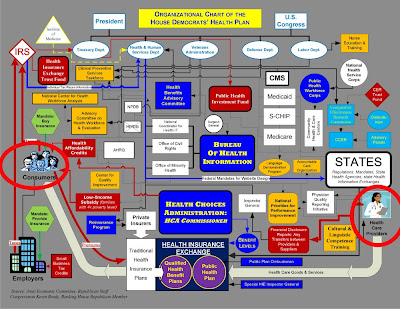 If the Health Care Reform Bill passes, it will create several new layers of bureaucracy in health care. The image above will be the new organizational chart for health care. If you look at the items I've circled, on the left is YOU (the consumer) and on the right are doctors. You will have to work your way through this maze to get to your doctors.
Can anybody name where bureaucracy has helped and not hindered your life? I can't. My dealings with most government agencies and employees has resulted in time delays and frustration. But if socialized medicine passes in this country, this is what we have to look forward to!
By the way, Congressman John Flemming (Louisiana) just introduced bill H.R. 615 this week which would require all members of Congress and Senate who vote for Health Care Reform to sign up under the plan. In other words, if our elected leaders feel strongly that this new health care system is the right thing for American, then they should be more than willing to sign up first under the new plan. This is common sense. Congressman Flemming also promises to keep track of voting records on this issue on his web site.
By the way, the Congressional Budget Office (CBO) stated yesterday that the Health Care Reform Bill would cost more than a trillion dollars.
The internet is a great resource for digging up truth (although you do have to be careful, because it's full of lies too). Here's a list of some trustworthy sites you may find useful:
CNS News: http://www.cnsnews.com/public/default.aspx
One News Now: http://www.onenewsnow.com/default.aspx
Open Congress: http://www.opencongress.org/
Citizens Against Government Waste: http://www.cagw.org/
 If the Health Care Reform Bill passes, it will create several new layers of bureaucracy in health care. The image above will be the new organizational chart for health care. If you look at the items I've circled, on the left is YOU (the consumer) and on the right are doctors. You will have to work your way through this maze to get to your doctors.
Can anybody name where bureaucracy has helped and not hindered your life? I can't. My dealings with most government agencies and employees has resulted in time delays and frustration. But if socialized medicine passes in this country, this is what we have to look forward to!
By the way, Congressman John Flemming (Louisiana) just introduced bill H.R. 615 this week which would require all members of Congress and Senate who vote for Health Care Reform to sign up under the plan. In other words, if our elected leaders feel strongly that this new health care system is the right thing for American, then they should be more than willing to sign up first under the new plan. This is common sense. Congressman Flemming also promises to keep track of voting records on this issue on his web site.
By the way, the Congressional Budget Office (CBO) stated yesterday that the Health Care Reform Bill would cost more than a trillion dollars.
The internet is a great resource for digging up truth (although you do have to be careful, because it's full of lies too). Here's a list of some trustworthy sites you may find useful:
CNS News: http://www.cnsnews.com/public/default.aspx
One News Now: http://www.onenewsnow.com/default.aspx
Open Congress: http://www.opencongress.org/
Citizens Against Government Waste: http://www.cagw.org/
How to do Basic Background Checks
If you pay attention to the news, you've probably seen the story about the Florida couple with 13 adopted kids that was murdered. So far eight people have been arrested in that case. This morning Fox News Channel mentioned reported that one of those arrested was a Realtor and some of the others were folks who have done work on the house.
Sadly,this is not an isolated story. More and more often now you hear stories of how murdered victims had relationships or ties to their killer. It's getting more difficult to know who to trust anymore as the news continues to remind us that you can really never know a person.
While most of us don't spend the time or money to do proper background checks on people who may be working around the house for us or others we encounter that can pose a potential threat, there are some basic step we can take for a preliminary check.
There's very little privacy today in America. And while many of us think that's a bad thing, it does allow you to find information on others more easily these days. Anytime you invite strangers to your home (realtors, landscapers, handymen, repairmen, computer techs, etc,), it's prudent to do a quick check on those people to see if any red flags are raised.
Here are some free checks you can do quickly and easily:
If you need more detailed information about a person, then you should spend the money to do a proper background check. It's not as expensive or complicated as it sounds. But if you're hiring a nanny, babysitter, etc. then you should really consider doing a proper background check.
One of the best sites open to the public is Intelius. This site offer a variety of different searches for a small fee.
Sadly,this is not an isolated story. More and more often now you hear stories of how murdered victims had relationships or ties to their killer. It's getting more difficult to know who to trust anymore as the news continues to remind us that you can really never know a person.
While most of us don't spend the time or money to do proper background checks on people who may be working around the house for us or others we encounter that can pose a potential threat, there are some basic step we can take for a preliminary check.
There's very little privacy today in America. And while many of us think that's a bad thing, it does allow you to find information on others more easily these days. Anytime you invite strangers to your home (realtors, landscapers, handymen, repairmen, computer techs, etc,), it's prudent to do a quick check on those people to see if any red flags are raised.
Here are some free checks you can do quickly and easily:
- Search the person's name in Google, MSN and Yahoo
- Search the person's name on MySpace.com
- Search the person's name on Facebook
- Search the person's name on WhitePages.com
If you need more detailed information about a person, then you should spend the money to do a proper background check. It's not as expensive or complicated as it sounds. But if you're hiring a nanny, babysitter, etc. then you should really consider doing a proper background check.
One of the best sites open to the public is Intelius. This site offer a variety of different searches for a small fee.
Subscribe to:
Posts (Atom)